LXC · Proxmox VE · Open SourceLXC · Proxmox VE · open source
PermLens
Rechte im Blick. Rechte-Manager für LXC-Container, derzeit speziell für Proxmox VE.Permissions in focus. A permission manager for LXC containers, currently built specifically for Proxmox VE.
Version 1.1.1 Öffentlich seit 1.0.0, frei erhältlich auf GitHub. Läuft als Docker-Container in einem eigenen LXC.Public since 1.0.0, freely available on GitHub. Runs as a Docker container in its own LXC.
Container → HostContainer → hostBeispielExample
- root0→ 100000
- app1000→ 101000
- Host/mnt/nas/fotos1000
- LXC/data/fotosnobody
So sieht es ausWhat it looks like
Rechte im BlickPermissions in focus
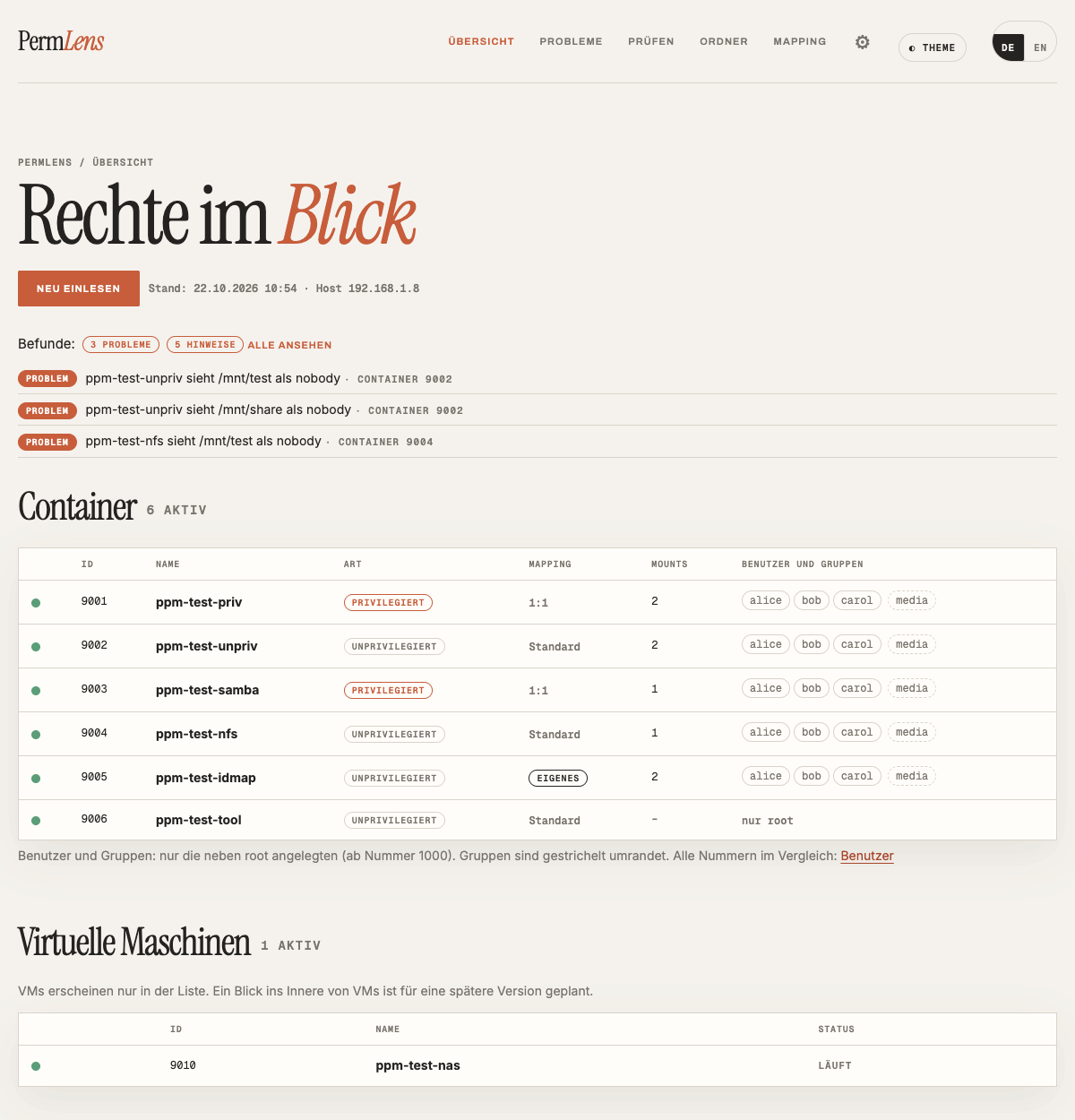
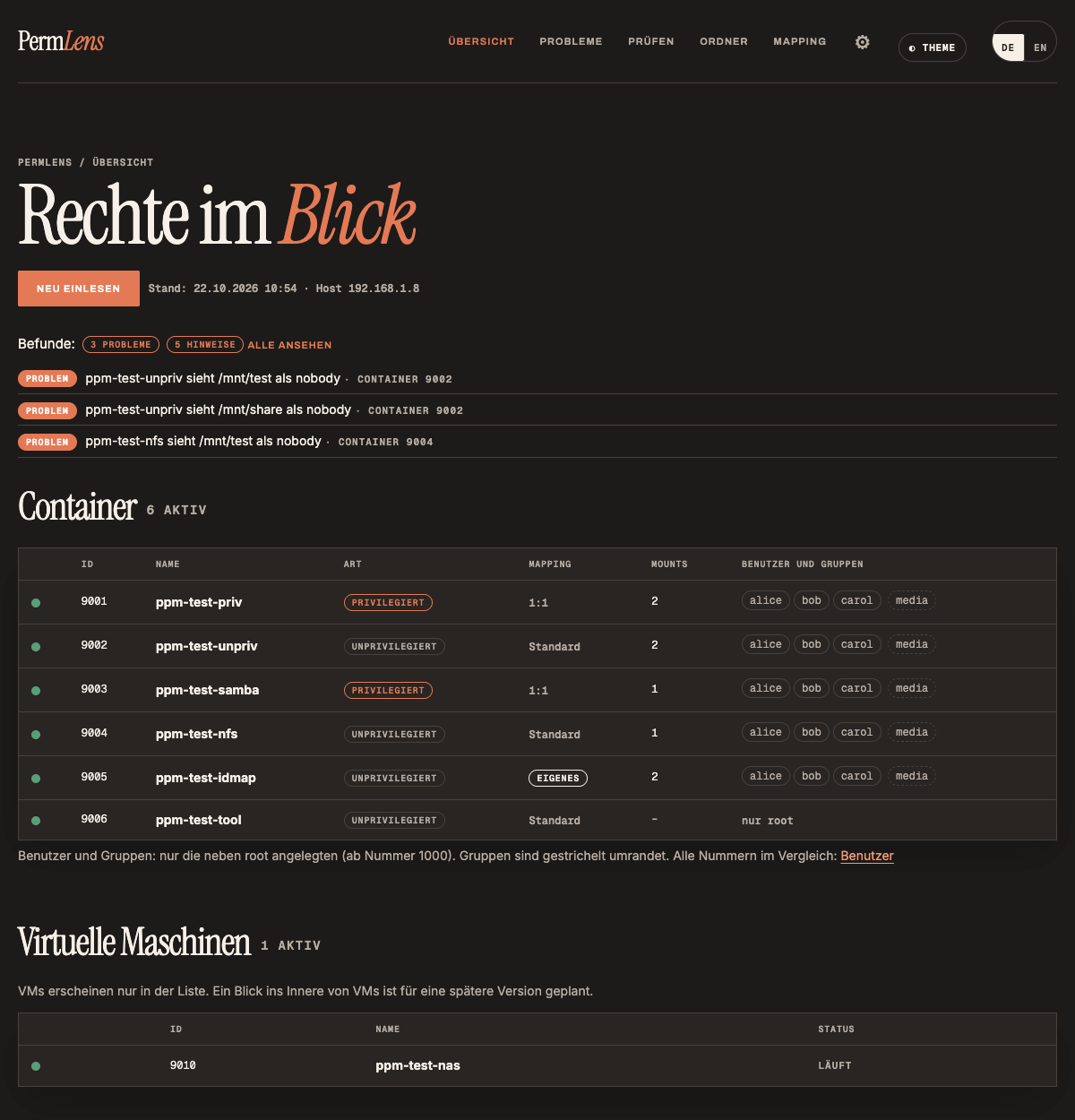
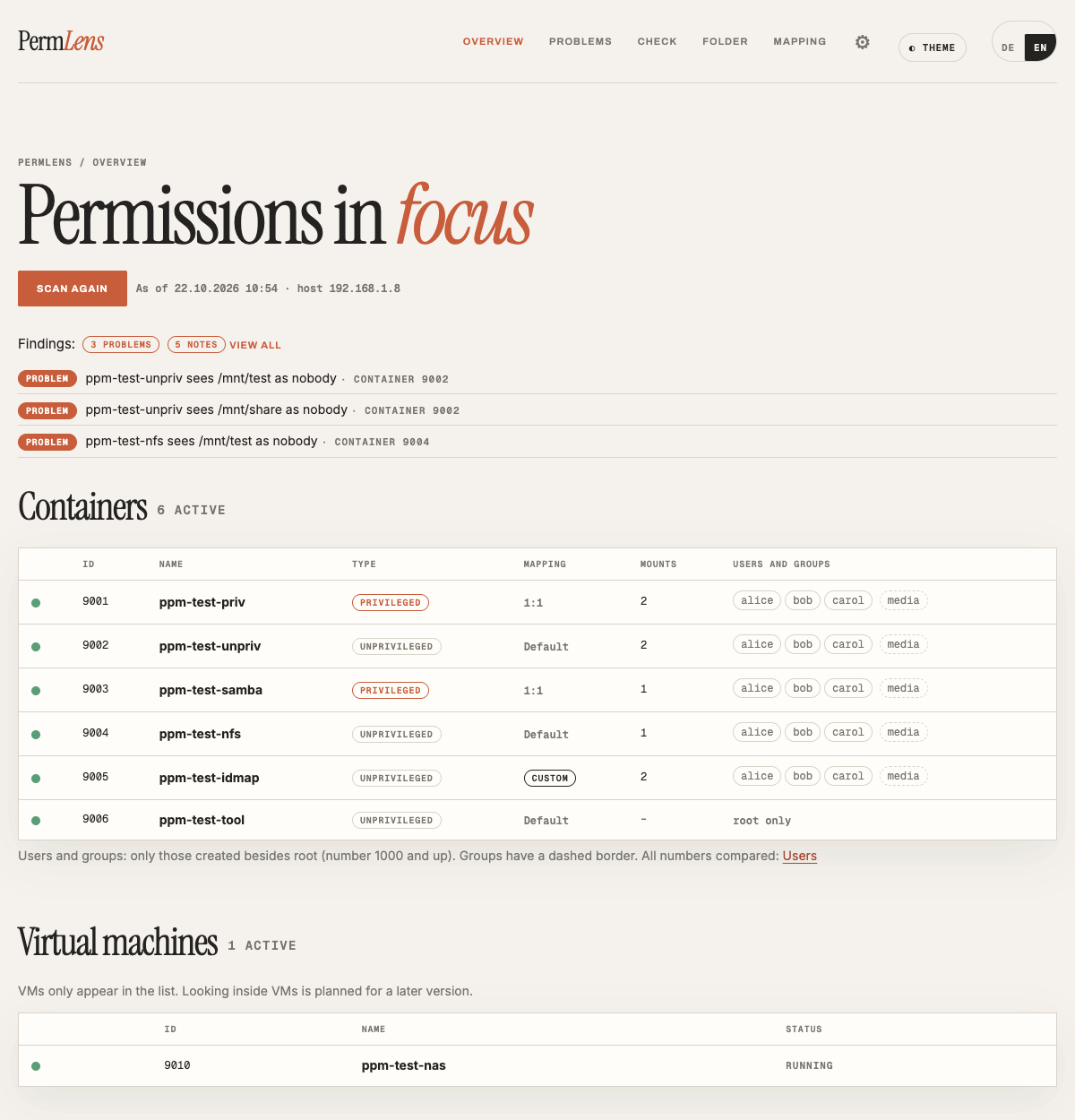
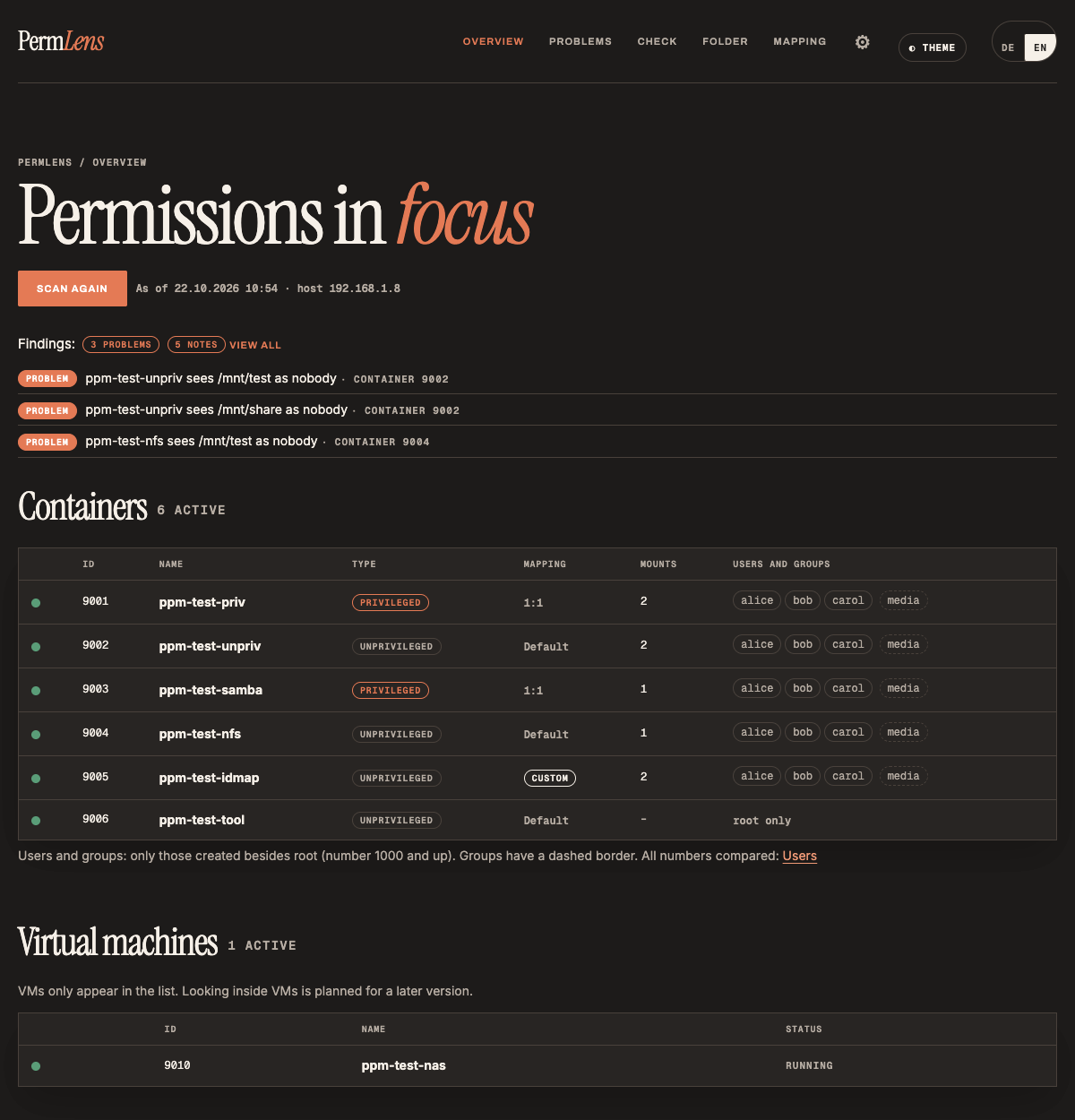
Das ProblemThe problem
Wem gehört die Datei wirklich?Who really owns that file?
Wer Proxmox mit LXC-Containern und einem NAS oder gemeinsamen Ordnern betreibt, kennt das: Ein Programm im Container schreibt Dateien, und danach kommt vom Mac oder PC niemand mehr heran. Oder der Container darf in seinen eigenen Ordner nicht schreiben. Schuld ist fast immer die Übersetzung der Benutzer-Nummern (UID/GID) zwischen Container und Host. Benutzer 1000 im Container ist auf dem Host plötzlich 101000, oder er erscheint als „nobody“. Viele lösen das, indem sie den Container privilegiert machen. Das funktioniert, schwächt aber die Abschottung.Anyone running Proxmox with LXC containers and a NAS or shared folders knows this: an app in a container writes files, and afterwards nobody can open them from a Mac or PC. Or the container is not allowed to write to its own folder. The cause is almost always how user numbers (UID/GID) are translated between container and host. User 1000 in the container suddenly becomes 101000 on the host, or shows up as “nobody”. Many people solve this by making the container privileged. That works, but weakens isolation.
Was PermLens zeigtWhat PermLens shows
Alles an einem Ort, nebeneinanderAll in one place, side by side
ÜbersichtOverview
Alle Container und VMsEvery container and VM
Alle LXCs und VMs, ob sie laufen, ob sie privilegiert oder unprivilegiert sind und ob sie ein eigenes Mapping haben.All LXCs and VMs, whether they are running, privileged or unprivileged, and whether they have a custom mapping.
ProblemeProblems
Ist alles in Ordnung?Is everything all right?
Nach jedem Einlesen prüft PermLens von selbst bekannte Fehlerquellen: Ordner, die ein Container als „nobody“ sieht, fehlende Mount-Quellen, gemeinsame Ordner ohne setgid, gleiche Namen mit verschiedenen Nummern, NFS mit no_root_squash und mehr. Zu jedem Problem gibt es eine Erklärung, einen Befehl zum Kopieren und die Einstufung harmlos, Vorsicht oder Risiko. Viele Lösungen kann PermLens auch selbst ausführen (siehe unten).After every scan PermLens checks known pitfalls on its own: folders a container sees as “nobody”, missing mount sources, shared folders without setgid, the same name with different numbers, NFS with no_root_squash and more. Every problem comes with an explanation, a command to copy and a rating: harmless, caution or risk. PermLens can carry out many fixes itself (see below).
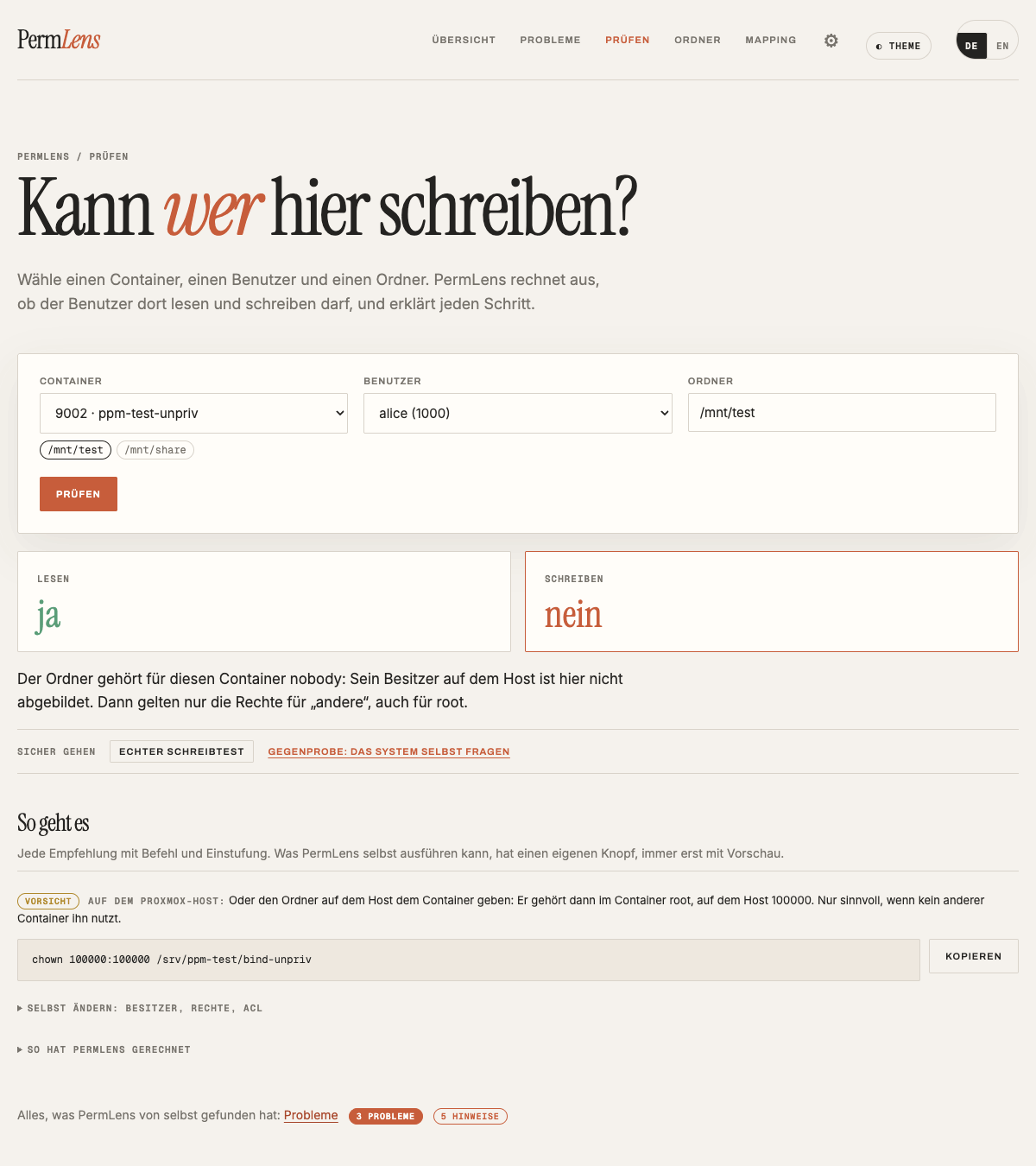
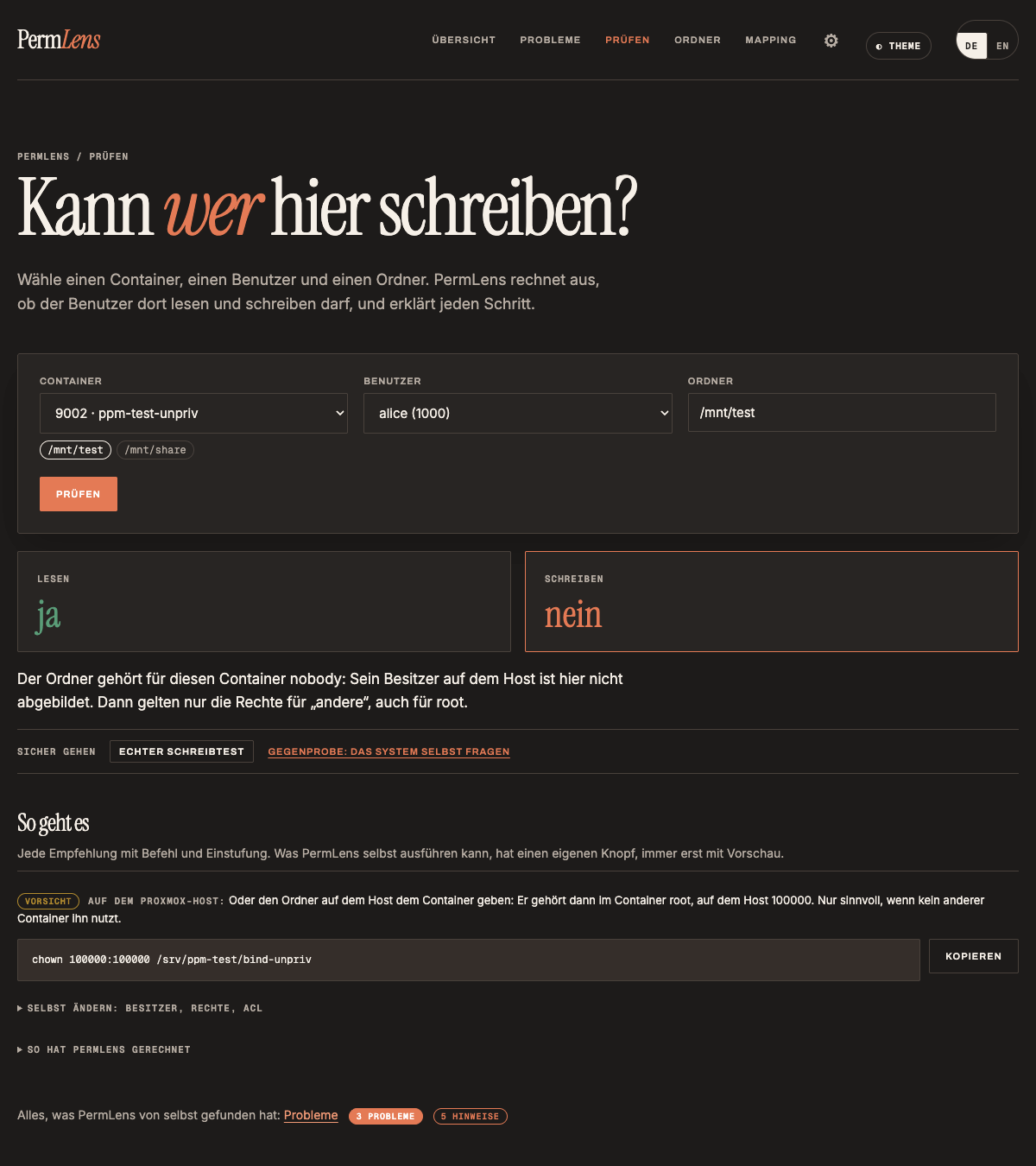
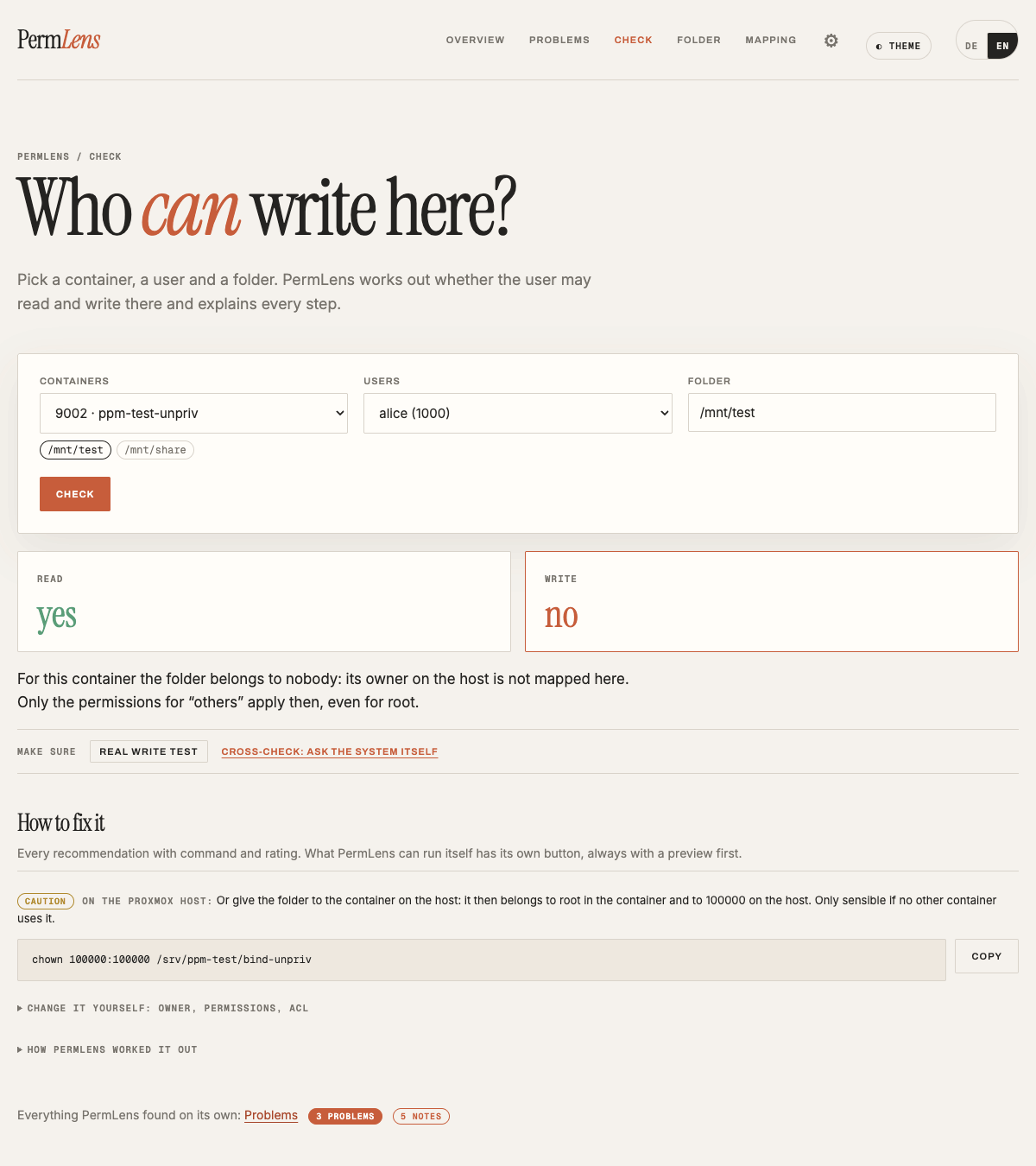
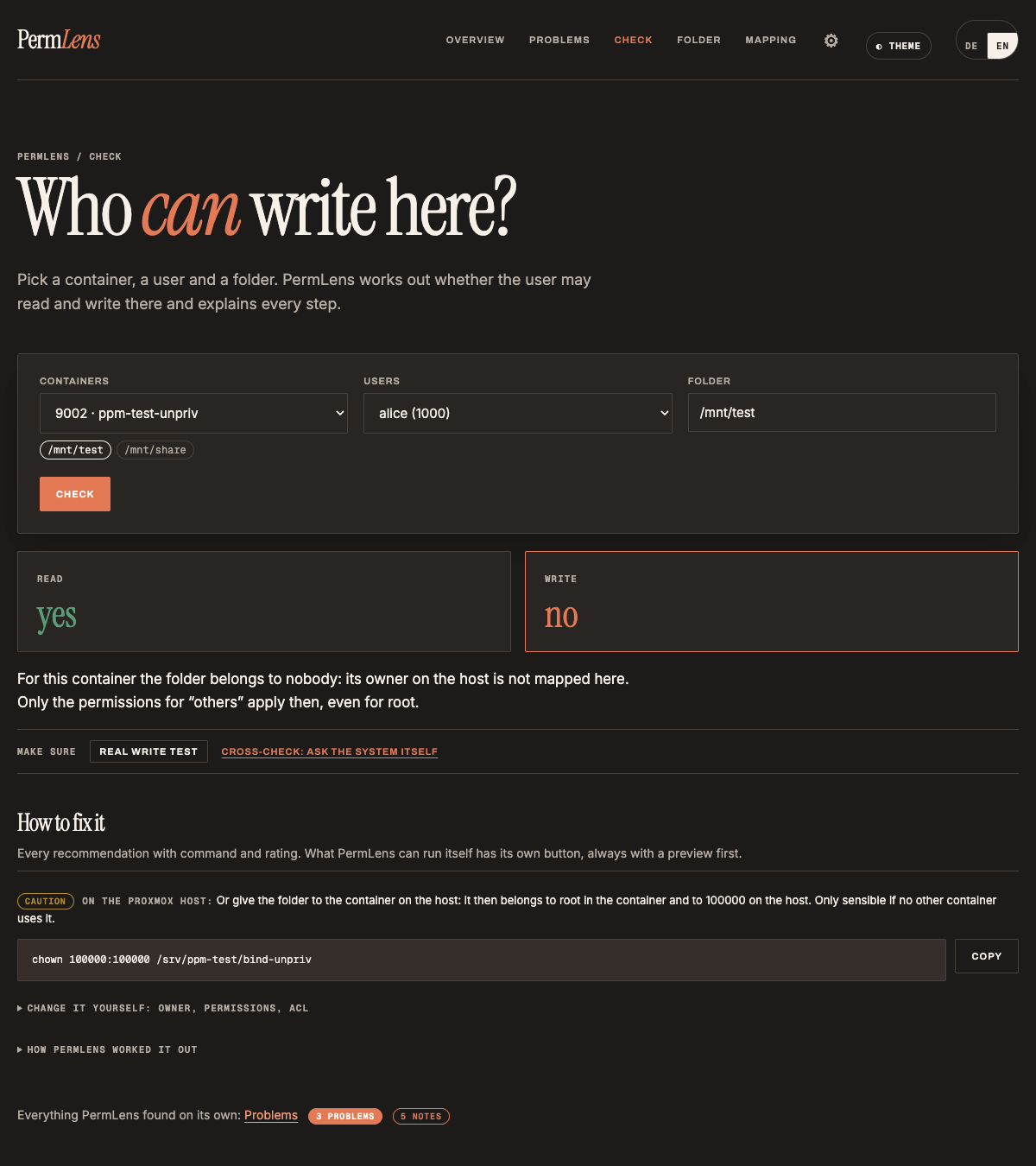
PrüfenCheck
Kann X hier schreiben?Can X write here?
Container, Benutzer und Ordner wählen. PermLens rechnet aus, ob Lesen und Schreiben klappt, und zeigt den Rechenweg: Besitzer, Gruppe, ACL, Mapping und jeden Ordner auf dem Weg. Eine Gegenprobe fragt im Container als dieser Benutzer nach, ohne etwas zu schreiben. Bei NFS ist sie nur ein Hinweis, deshalb gibt es zusätzlich einen echten Schreibtest. Unter jeder Antwort steht „So geht es“ mit dem passenden Weg.Pick a container, a user and a folder. PermLens works out whether reading and writing will work and shows how it got there: owner, group, ACL, mapping and every folder along the path. A cross-check asks inside the container as that user, without writing anything. With NFS it is only a hint, so there is also a real write test. Below every answer, “How to fix it” shows the matching way forward.
Container
Wer ist wer?Who is who?
Jeder Benutzer im Container mit UID und GID, in Klartext erklärt (bei www-data etwa: „Unter diesem Namen laufen Webserver wie nginx oder Apache.“), und wer er auf dem Host ist. Dazu die Einstellungen aus /etc/pve/lxc/<Nr>.conf mit Erklärung der wichtigen Zeilen. Eine eigene Seite zeigt jeden Namen und jede Nummer über den Host und alle Container, Unterschiede stehen oben.Every user in the container with UID and GID, explained in plain words (for www-data, e.g.: “Web servers such as nginx or Apache run under this name.”), and who they are on the host. Plus the settings from /etc/pve/lxc/<id>.conf with the important lines explained. A separate page shows every name and number across the host and all containers, with differences at the top.
Mapping
Aus 1000 wird …1000 becomes …
Welche Nummern im Container zu welchen Nummern auf dem Host werden, und welche „durchgereicht“ werden.Which numbers inside the container become which numbers on the host, and which are passed through.
OrdnerFolders
Host und ContainerHost and container
Jeder eingehängte Ordner mit Besitzer und Rechten, auf dem Host und im Container nebeneinander, dazu ACLs. Auch NFS- und SMB-Freigaben, die ein Container selbst einhängt. Jeder gemeinsam genutzte Ordner erscheint mit allen Containern, die ihn nutzen, und wie er von jedem aus aussieht.Every mounted folder with owner and permissions, on the host and inside the container side by side, plus ACLs. Also NFS and SMB shares a container mounts itself. Every shared folder appears with all containers using it and how it looks from each of them.
FreigabenShares
Samba und NFSSamba and NFS
Bei Samba-Containern jede Freigabe mit Ordner, wer sich anmelden darf und als wer geschrieben wird. NFS-Exporte mit Erklärung der Optionen, z. B. root_squash.For Samba containers, every share with its folder, who may log in and as whom files are written. NFS exports with their options explained, e.g. root_squash.
Host
Was der Host siehtWhat the host sees
Alle Speicher des Proxmox-Hosts mit ihrem Zweck (z. B. nur Backups) und den Containern, die sie nutzen, dazu von Hand eingehängte Netzfreigaben, die Benutzer des Hosts und wofür jeder Nummernbereich in /etc/subuid gebraucht wird.All storage of the Proxmox host with its purpose (e.g. backups only) and the containers using it, plus manually mounted network shares, the host’s users and what each number range in /etc/subuid is needed for.
Mapping-AssistentMapping assistant
Sicher unprivilegiertSafely unprivileged
Unprivilegierte Container sind sicherer, sehen gemeinsame Ordner aber oft als „nobody“. Der Assistent rechnet aus, welche Nummern durchgereicht werden müssen, und zeigt die Befehle zum Kopieren: als Bauplan für einen neuen Container (z. B. paperless-ngx), als Vorschlag für einen bestehenden oder als geführten Umstieg von privilegiert auf unprivilegiert, bei dem der alte Container als Rückfall erhalten bleibt. Am Host ändert PermLens dabei nichts selbst.Unprivileged containers are safer but often see shared folders as “nobody”. The assistant works out which numbers have to be passed through and shows the commands to copy: as a blueprint for a new container (e.g. paperless-ngx), as a suggestion for an existing one, or as a guided switch from privileged to unprivileged that keeps the old container as a fallback. PermLens itself changes nothing on the host.
Docker · neu in 1.1Docker · new in 1.1
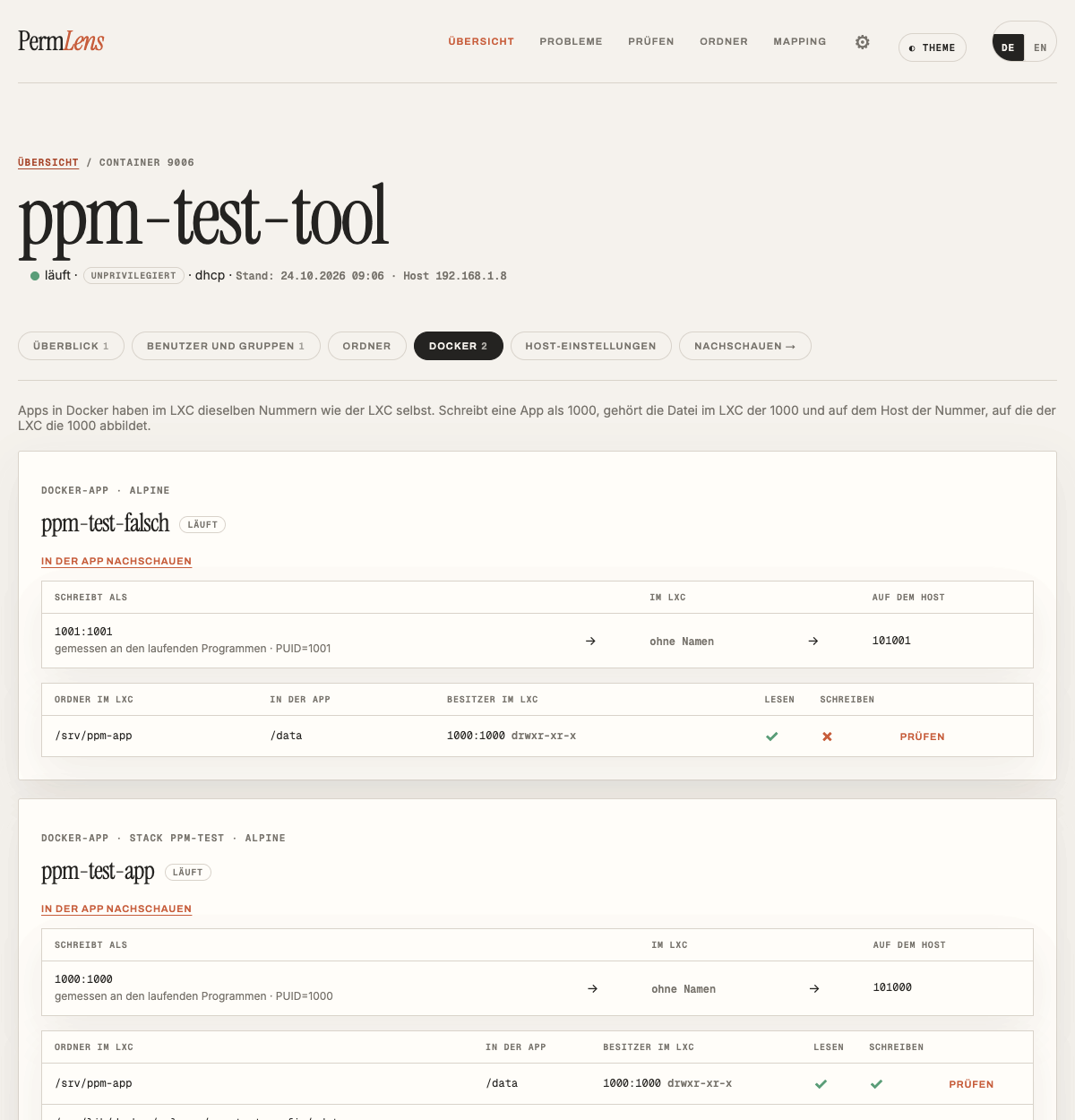
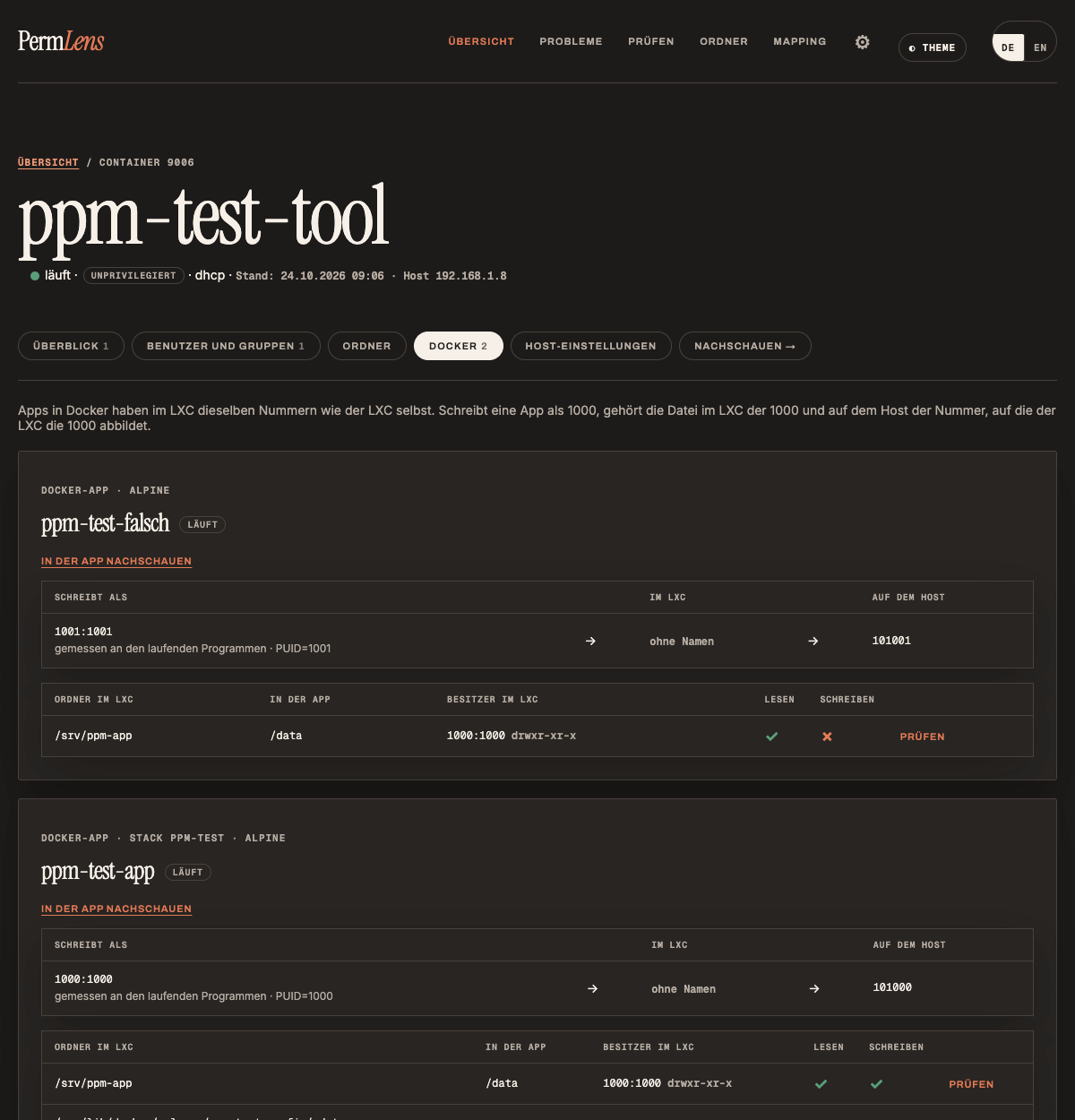
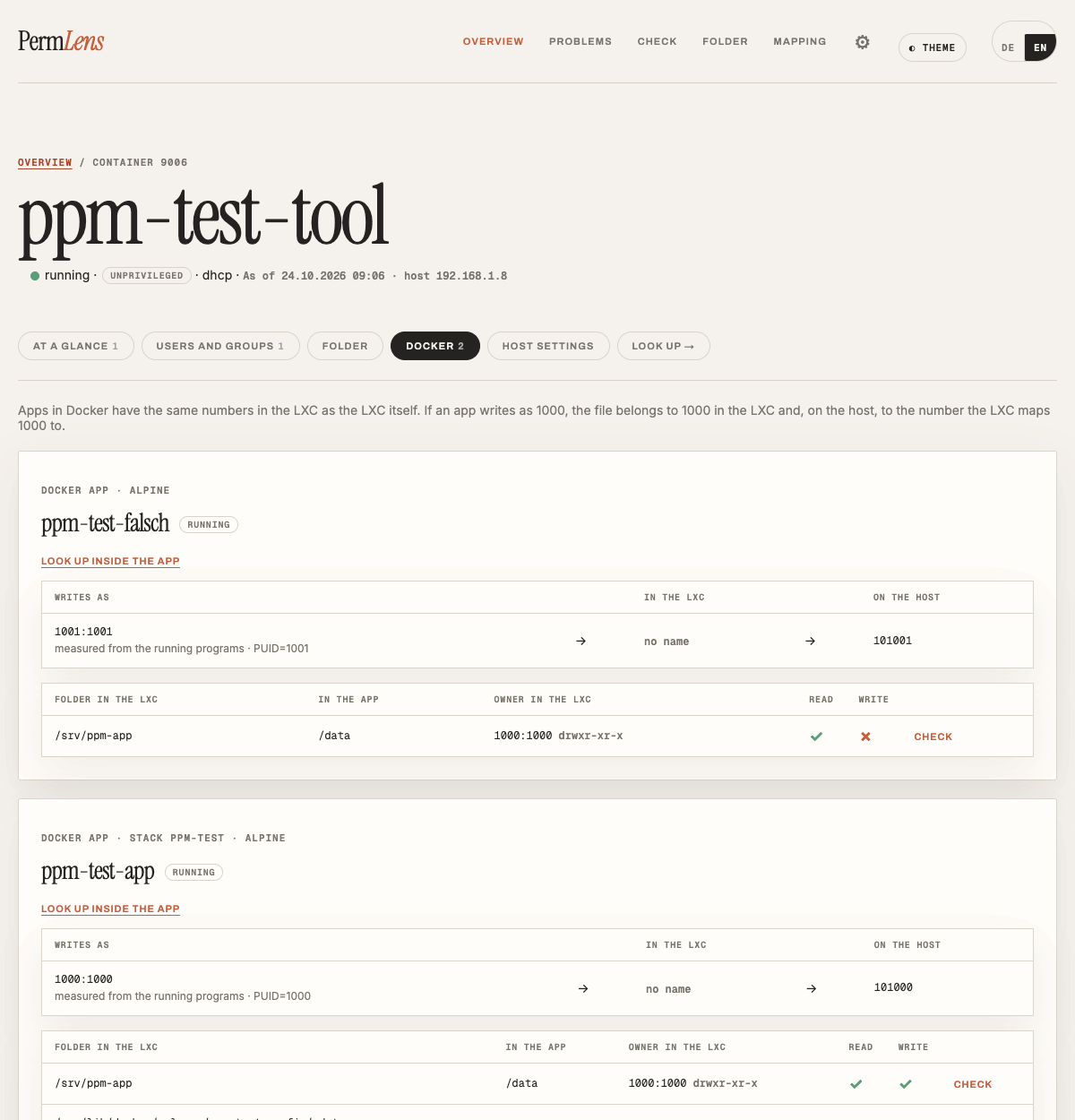
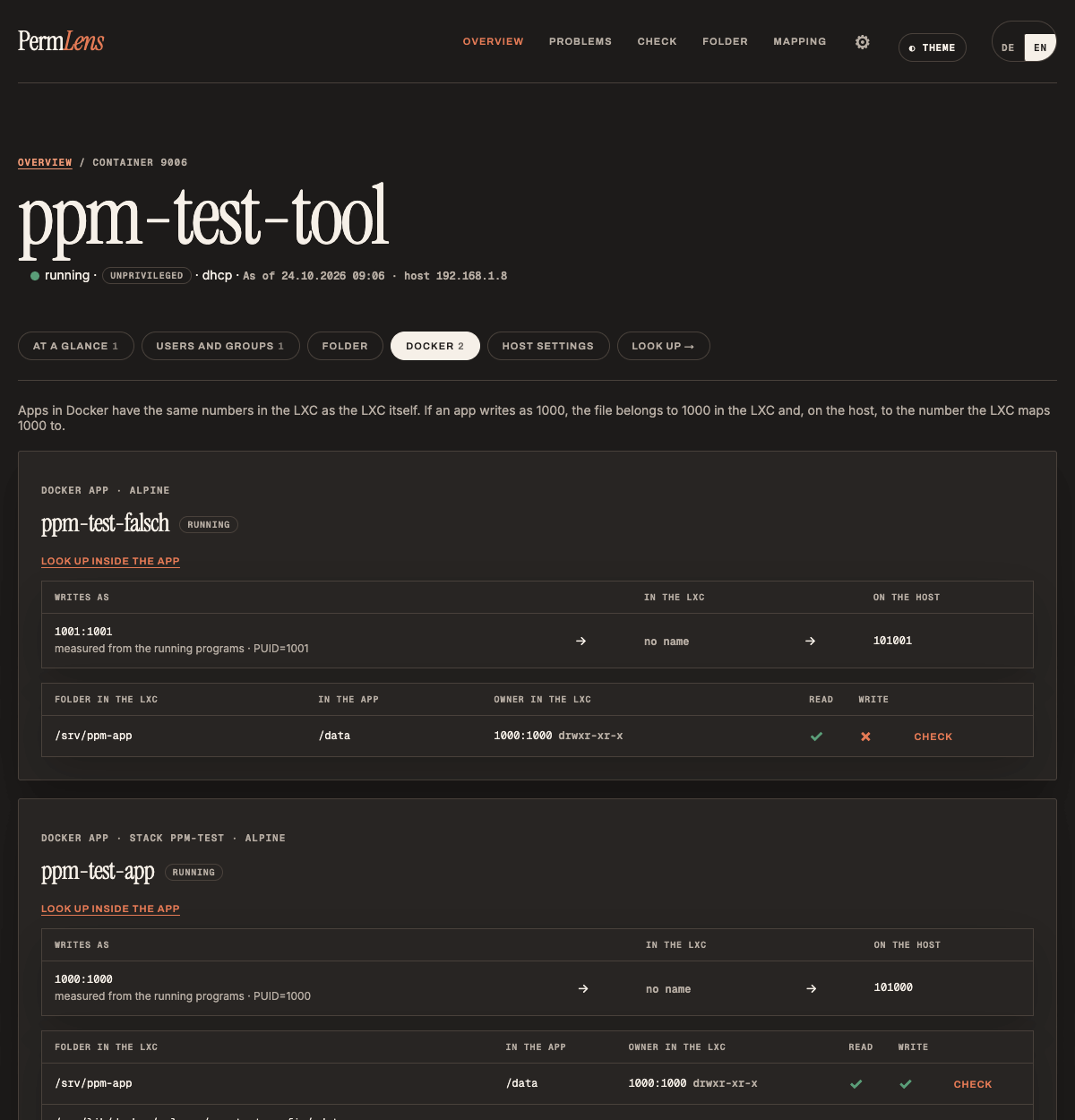
Als wer schreibt meine App?Who does my app write as?
Läuft im LXC Docker, zeigt PermLens je App die ganze Kette: als welche Nummer sie wirklich schreibt (gemessen an ihren laufenden Programmen, sonst PUID/PGID aus der Stack-Datei), wer das im Container und auf dem Host ist, und ob sie in ihre eingehängten Ordner schreiben darf. Probleme wie „App kann nicht in /data schreiben“ oder „App schreibt als root“ findet PermLens von selbst, Prüfen rechnet für eine App wie für einen Benutzer. Passwörter aus den Umgebungsvariablen bekommt PermLens nie zu sehen.If Docker runs in the LXC, PermLens shows the whole chain for every app: which number it really writes as (measured from its running programs, otherwise PUID/PGID from the stack file), who that is in the container and on the host, and whether it may write to its mounted folders. Problems such as “app cannot write to /data” or “app writes as root” are found automatically, and Check works for an app just like for a user. PermLens never gets to see passwords from the environment variables.
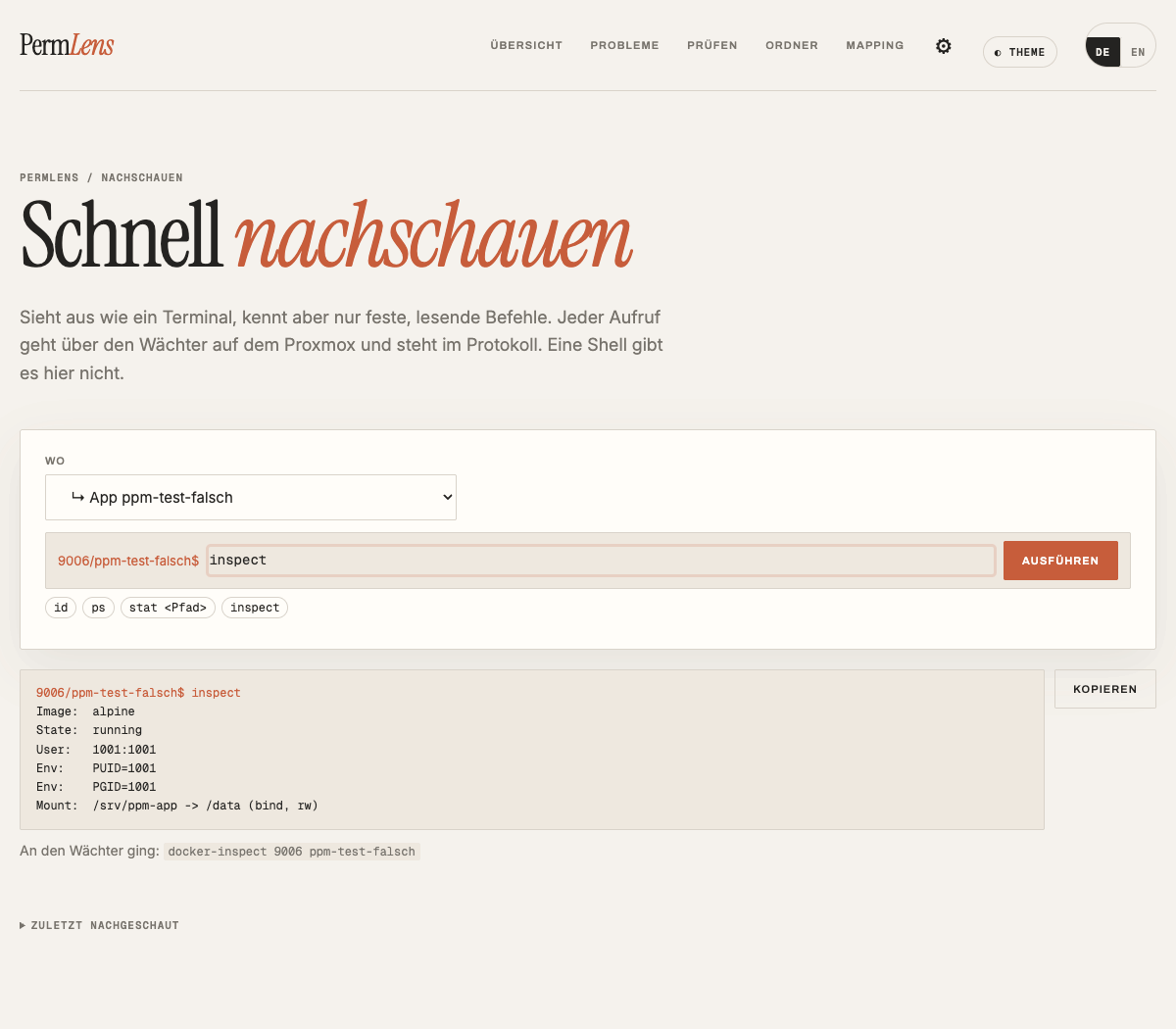
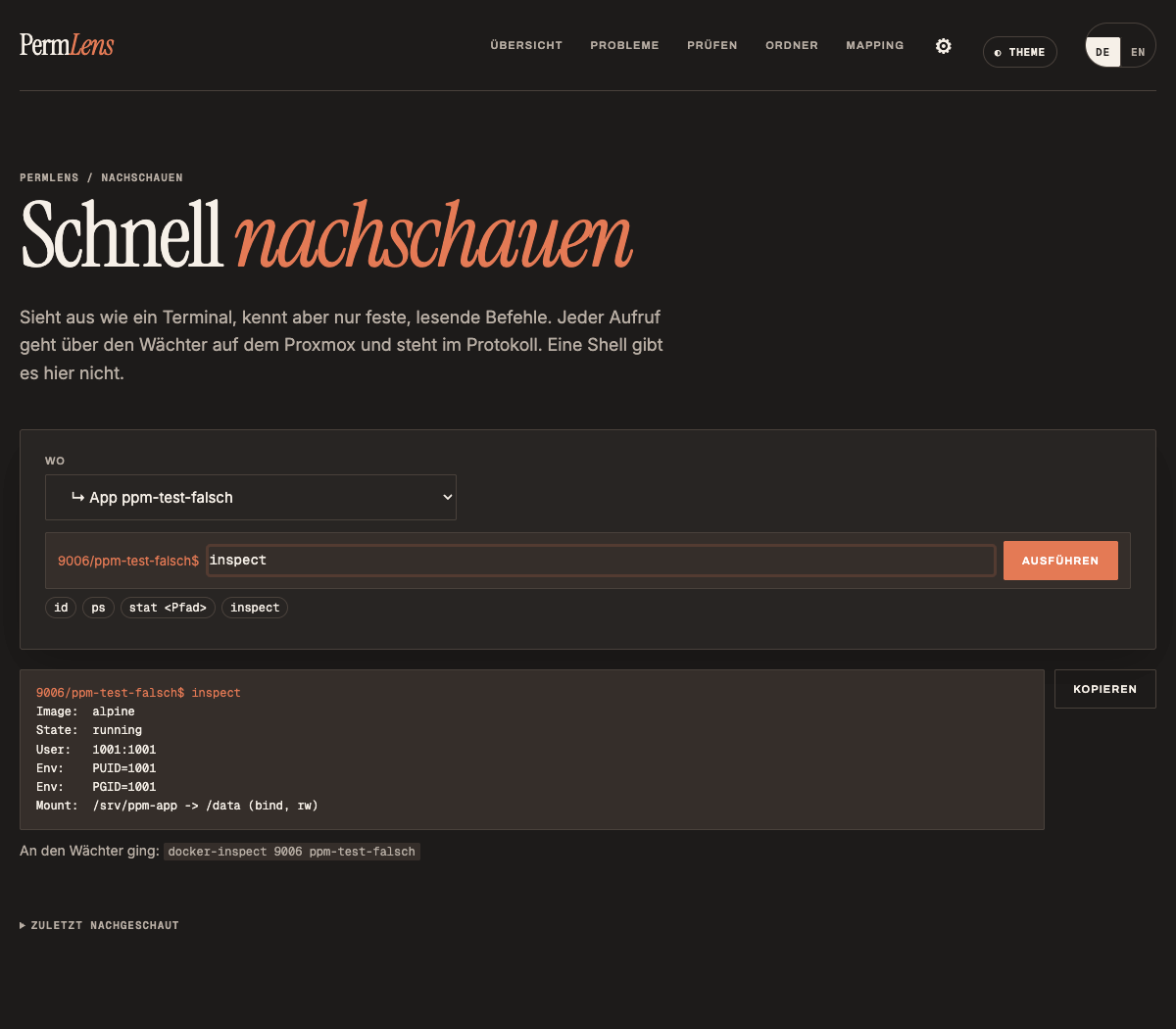
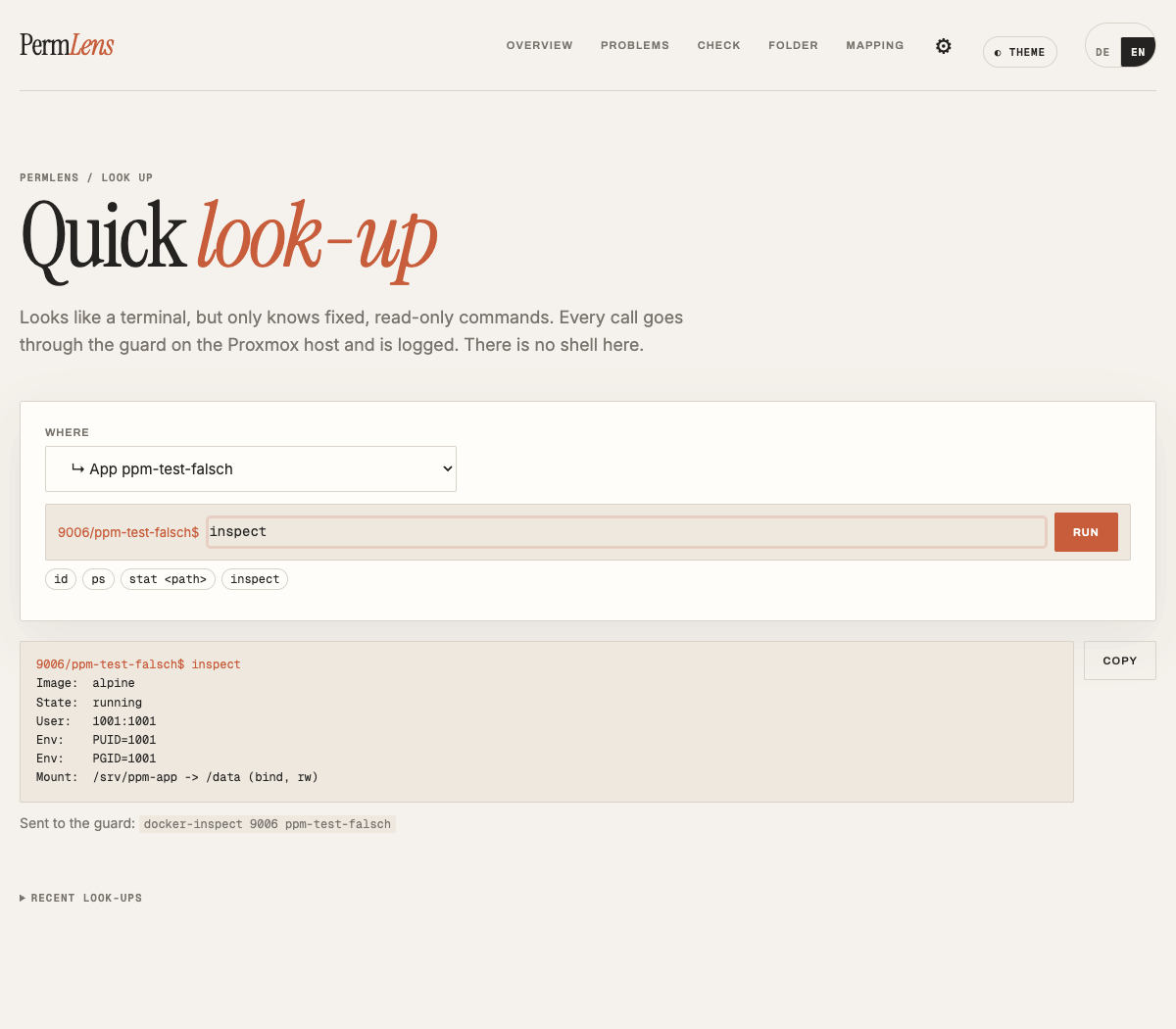
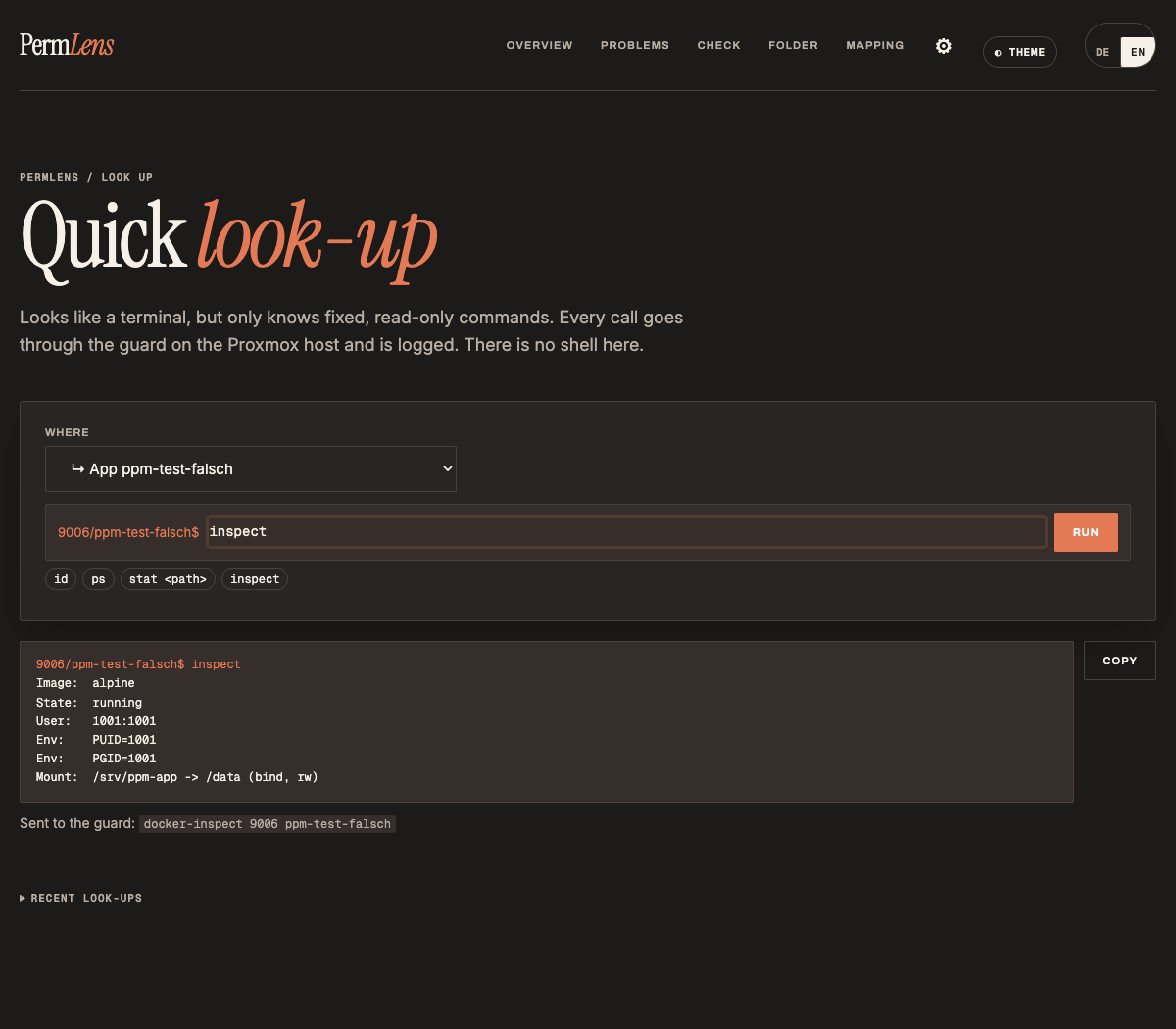
Nachschauen · neu in 1.1Look up · new in 1.1
Wie ein Terminal, nur lesendLike a terminal, read-only
Eine Konsole, die aussieht wie ein Terminal, aber nur feste, lesende Befehle kennt (id, ls -ld, stat, getfacl, df -h, docker ps …), für den Host, einen Container oder eine Docker-App. Keine Shell, keine Dateiinhalte.A console that looks like a terminal but only knows fixed, read-only commands (id, ls -ld, stat, getfacl, df -h, docker ps …), for the host, a container or a Docker app. No shell, no file contents.
Was PermLens ändern kannWhat PermLens can change
Die Lösung gleich umsetzenApply the fix right away
Wenn du es auf dem Proxmox für einzelne Container freigibst, setzt PermLens die Lösung selbst um.If you allow it on the Proxmox host for individual containers, PermLens applies the fix itself.
OrdnerFolders
Besitzer, Rechte, ACLOwner, permissions, ACL
Besitzer, Rechte und ACLs, für einen Ordner oder den ganzen Ordnerbaum. Vor Änderungen am ganzen Baum sichert PermLens Besitzer, Rechte und ACLs aller Dateien.Owner, permissions and ACLs, for one folder or the whole tree. Before changing a whole tree, PermLens backs up owner, permissions and ACLs of every file.
Benutzer und GruppenUsers and groups
Im ContainerInside the container
Anlegen, löschen, in Gruppen aufnehmen, Hauptgruppe, Nummern ändern und Dateien umnummerieren („gleicher Name, andere Nummer“).Create, delete, add to groups, primary group, change numbers and renumber files (“same name, different number”).
SchreibtestWrite test
Echt ausprobierenActually try it
Legt als ein Benutzer eine leere Datei an und löscht sie wieder. Sicher auch bei NFS.Creates an empty file as a user and deletes it again. Reliable with NFS too.
AbsicherungSafeguards
Immer gleich abgesichertAlways the same safeguards
Vorschau mit genauem Befehl, Einstufung harmlos / Vorsicht / Risiko, was sich für wen ändert, Rückgängig-Befehl. Bei Risiko tippst du die Container-Nummer ein. Danach prüft PermLens nach, alles steht im Protokoll und lässt sich zurückdrehen.Preview with the exact command, rating harmless / caution / risk, what changes for whom, the undo command. For risk you type the container number. Afterwards PermLens verifies the result; everything is logged and can be undone.
NieNever
Was tabu bleibtWhat stays off-limits
root, Systemkonten, Systemordner, Passwörter, der Host selbst.root, system accounts, system folders, passwords, the host itself.
AußerdemAlso
Was sonst noch dabei istWhat else is included
Mehrere ProxmoxSeveral hosts
Eine OberflächeOne interface
Mehrere Proxmox in einer Oberfläche, oben in der Kopfzeile umschalten. Jeder Proxmox entscheidet selbst, ob PermLens dort ändern darf.Several Proxmox hosts in one interface, switch at the top. Each host decides for itself whether PermLens may change things there.
AnmeldungLogin
Zwei-FaktorTwo-factor
Zwei-Faktor-Anmeldung mit einer Authenticator-App (TOTP), dazu Ersatz-Codes.Two-factor login with an authenticator app (TOTP), plus backup codes.
Updates
Hinweis auf neue VersionenNew-version notice
Ein Hinweis in der Fußzeile, wenn es eine neue Version gibt. Eingespielt wird nichts von selbst, das Update machst du über Dockhand (Pull → Redeploy). Abschaltbar.A notice in the footer when a new version is out. Nothing is installed by itself; you update via Dockhand (pull → redeploy). Can be switched off.
Was noch kommtComing next
Später gezielte Änderungen an der Container-Einstellung mit Vorschau, etwa für den Umstieg auf unprivilegiert, und ein Blick in VMs. Wünsche gerne über GitHub-Issues.Later, targeted changes to the container settings with preview, e.g. for switching to unprivileged, and a look into VMs. Suggestions are welcome via GitHub issues.
Installation
In einem eigenen LXCIn its own LXC
Ein Docker-Container in einem kleinen Debian-LXC, ein Ordner für die Daten, ein Befehl auf dem Proxmox. 1 Kern, 512 MB RAM und 8 GB Speicher reichen. Rechne mit etwa 15 Minuten. Ausführlich mit Hilfe bei Problemen: Installationsanleitung.One Docker container in a small Debian LXC, one folder for the data, one command on the Proxmox host. 1 core, 512 MB RAM and 8 GB of storage are enough. Allow about 15 minutes. In detail, with troubleshooting: installation guide.
VorbereitenPrepare
- In Proxmox einen LXC anlegen: Debian 13, unprivilegiert, mit fester IP-Adresse (der SSH-Schlüssel von PermLens gilt später nur von dieser Adresse aus). Danach unter Optionen → Features
nestingundkeyctleinschalten und den Container starten.Create an LXC in Proxmox: Debian 13, unprivileged, with a fixed IP address (PermLens’ SSH key will only be valid from this address). Then switch onnestingandkeyctlunder Options → Features and start the container. - In der Konsole des LXC Docker installieren (Befehle im Kasten). Mit Dockhand: eine neue Umgebung für den LXC anlegen (Hawser-Agent) und den angezeigten Befehl im LXC ausführen. Docker und Hawser in einem Rutsch: mein Tipp dazu.Install Docker in the LXC’s console (commands in the box). With Dockhand: create a new environment for the LXC (Hawser agent) and run the command it shows in the LXC. Docker and Hawser in one go: my guide for that.
- Den Datenordner anlegen. Darin liegen später Datenbank, Einstellungen und der SSH-Schlüssel von PermLens. Diesen Ordner sichern.Create the data folder. It will hold the database, settings and PermLens’ SSH key. Back this folder up.
# im PermLens-LXC als root# in the PermLens LXC as root
apt-get update && apt-get install -y docker.io
mkdir -p /opt/permlens/data
- AdresseAddress
https://<IP-des-LXC>:8443- ZugriffAccess
- Nur Heimnetz, immer mit PasswortHome network only, always password-protected
- PlattformenPlatforms
- Proxmox VE · Debian-LXC
- LizenzLicense
- GPL-3.0-or-later
Mit DockhandWith Dockhand
- In Dockhand für den LXC einen neuen Stack „permlens“ anlegen.In Dockhand, create a new stack called “permlens” for the LXC.
- Die Compose-Datei aus dem Kasten einfügen.Paste the compose file from the box.
- Bei den Variablen des Stacks
APP_PASSWORDmit deinem Passwort anlegen (mindestens 8 Zeichen), dann Deploy.Under the stack’s variables, addAPP_PASSWORDwith your password (at least 8 characters), then Deploy.
Ohne DockhandWithout Dockhand
Im LXC die Compose-Datei holen, das Passwort in eine .env schreiben und starten:In the LXC, fetch the compose file, put the password into a .env file and start it:
cd /opt/permlens
curl -O https://raw.githubusercontent.com/luro611/permlens/main/docker-compose.homelab.yml
echo 'APP_PASSWORD=dein-passwortyour-password' > .env
docker compose -f docker-compose.homelab.yml up -d
Ob PermLens läuft, zeigt Dockhand oder docker ps, die Meldungen beim Start docker logs permlens. Tipp: Läuft PermLens allein im LXC, "80:8000", "443:8443" und HTTPS_PORT=443 eintragen, dann geht es ohne Portnummer.Dockhand or docker ps shows whether PermLens is running, docker logs permlens shows the start-up messages. Tip: if PermLens runs alone in the LXC, use "80:8000", "443:8443" and HTTPS_PORT=443 to reach it without a port number.
services:
  permlens:
    image: ghcr.io/luro611/permlens:latest
    container_name: permlens
    ports:
      # 8000 leitet auf HTTPS um, 8443 = HTTPS# 8000 redirects to HTTPS, 8443 = HTTPS
      - "8000:8000"
      - "8443:8443"
    environment:
      - TZ=Europe/Berlin
      - HTTPS_PORT=8443
      # Pflicht, Wert bei den Variablen des Stacks# required, value in the stack variables
      - APP_PASSWORD=${APP_PASSWORD}
      # 0 = nur Heimnetz, nie ins Internet# 0 = home network only, never the internet
      - ALLOW_PUBLIC=0
    volumes:
      # Datenbank, Einstellungen, SSH-Schlüssel# database, settings, SSH key
      - /opt/permlens/data:/app/data
    restart: unless-stopped
Mit dem Proxmox verbindenConnect to Proxmox
- Im Browser
https://<IP-des-LXC>:8443öffnen und anmelden. Der Browser warnt beim ersten Mal, weil PermLens ein eigenes Zertifikat hat. Vergleiche den SHA-256-Fingerabdruck im Browser mit dem Befehl im Kasten, dann die Ausnahme speichern. Empfohlen: gleich unter Einstellungen die Zwei-Faktor-Anmeldung einschalten.Openhttps://<IP-of-the-LXC>:8443in your browser and sign in. The browser warns the first time because PermLens uses its own certificate. Compare the SHA-256 fingerprint in the browser with the command in the box, then save the exception. Recommended: switch on two-factor login under Settings right away. - PermLens zeigt einen Befehl. Den in der Shell des Proxmox ausführen (Weboberfläche → Knoten → „>_ Shell“). Er installiert das Wächter-Script, erlaubt den Schlüssel von PermLens und meldet sich bei PermLens zurück. Nummer und Adresse des LXC musst du nirgends eintragen. Bitte vorher lesen: Host-Zugriff.PermLens shows one command. Run it in the Proxmox shell (web interface → node → “>_ Shell”). It installs the guard script, allows PermLens’ key and reports back to PermLens. You don’t need to enter the LXC’s number or address anywhere. Please read first: Host access.
- Fertig: PermLens liest alle Container und VMs ein und springt zur Übersicht. Bis hierhin liest es nur.Done: PermLens scans all containers and VMs and jumps to the overview. Up to here it only reads.
Neue Version: in Dockhand Pull und Redeploy. Welche Version läuft, steht unten auf jeder Seite, und PermLens zeigt dort auch, wenn es eine neue gibt. Alles im Detail: Installation, Anleitung und Betrieb.New version: Pull and Redeploy in Dockhand. The running version is shown at the bottom of every page, and PermLens also tells you there when a new one is out. All the details: installation guide and user manual.
# im PermLens-LXC: Fingerabdruck des Zertifikats# in the PermLens LXC: certificate fingerprint
docker exec permlens openssl x509 -in /app/data/tls/cert.pem \
  -noout -fingerprint -sha256
Ändern freischalten (optional)Allow changes (optional)
Soll PermLens Lösungen selbst umsetzen, legst du auf dem Proxmox eine Datei mit den Containern an, in denen es ändern darf. Alle anderen bleiben nur lesbar. Datei löschen, und PermLens liest sofort wieder nur.If PermLens should apply fixes itself, create a file on the Proxmox host listing the containers it may change. All others stay read-only. Delete the file and PermLens immediately goes back to reading only.
# auf dem Proxmox, z. B. Container 105 und 110 bis 112# on the Proxmox host, e.g. containers 105 and 110 to 112
mkdir -p /etc/permlens
echo '105,110-112' > /etc/permlens/schreiben-erlaubt
Sicherheit und BetriebSecurity and operation
Ändert nur mit Erlaubnis, bleibt zu HauseChanges only with permission, stays at home
SicherheitSecurity
PermLens spricht nur über SSH mit dem Proxmox-Host, mit einem eigenen Schlüssel, der ausschließlich ein kleines Wächter-Script aufrufen darf. Das Script lässt nur Befehle aus einer festen Liste durch und protokolliert jeden Aufruf. Ohne deine Freigabe auf dem Host liest PermLens nur. Von Docker-Apps gibt der Wächter nur Name, Image, Benutzer, Ordner und Nummern wie PUID heraus, nie Passwörter aus den Umgebungsvariablen. Ändern geht erst, wenn du auf dem Proxmox eine Schalter-Datei mit den erlaubten Containern anlegst. Die Oberfläche ist immer mit Passwort geschützt und nur aus dem Heimnetz erreichbar. PermLens gehört nie ins Internet. Was genau auf dem Host passiert, steht weiter unten.PermLens talks to the Proxmox host only via SSH, using its own key that may do nothing but call a small guard script. The script only lets commands from a fixed list through and logs every call. Without your permission on the host PermLens only reads. For Docker apps the guard only hands out name, image, user, folders and numbers such as PUID, never passwords from the environment variables. Changing only works once you create a switch file on the Proxmox host listing the allowed containers. The interface is always password-protected and only reachable from the home network. PermLens must never be exposed to the internet. Exactly what happens on the host is described below.
BetriebOperation
Läuft als Docker-Container in einem eigenen LXC, Bedienung im Browser über HTTPS. Einrichten in wenigen Schritten nach der Installationsanleitung: LXC anlegen, Docker, Stack in Dockhand, ein Befehl auf dem Proxmox. Verwaltung und Updates bequem über Dockhand (Stack → Pull → Redeploy). Oberfläche auf Deutsch und Englisch, hell und dunkel.Runs as a Docker container in its own LXC, used in the browser over HTTPS. Set up in a few steps following the installation guide: create an LXC, Docker, a stack in Dockhand, one command on the Proxmox host. Managed and updated conveniently via Dockhand (stack → pull → redeploy). Interface in German and English, light and dark.
- ZugriffAccess
- Nur Heimnetz, immer mit PasswortHome network only, always password-protected
- HostHost
- SSH mit eigenem Schlüssel; ändern nur mit Schalter-DateiSSH with its own key; changes only with a switch file
- LizenzLicense
- GPL-3.0-or-later
SicherheitshinweisSecurity note
Sicherheit ist mir wichtigSecurity matters to me
PermLens bekommt Zugriff auf deinen Proxmox-Host. Deshalb ist es so gebaut, dass es möglichst wenig darf und alles nachprüfbar bleibt:PermLens gets access to your Proxmox host. That is why it is built to be allowed as little as possible and to keep everything verifiable:
- Wächter statt Vollzugriff: Der SSH-Schlüssel von PermLens darf nur ein kleines Wächter-Script aufrufen. Das lässt nur Befehle aus einer festen Liste durch, prüft bei Änderungen jeden Wert und protokolliert jeden Aufruf.A guard instead of full access: PermLens’ SSH key may only call a small guard script. It only lets commands from a fixed list through, checks every value for changes and logs every call.
- Geprüfte Einrichtung: Der Einrichtungs-Befehl führt nur ein Script aus, dessen Prüfsumme stimmt. Er lädt es über HTTPS und akzeptiert dabei nur das Zertifikat deines eigenen PermLens.Verified setup: The setup command only runs a script whose checksum matches. It loads it over HTTPS and only accepts the certificate of your own PermLens.
- Verschlüsselt: Die Oberfläche läuft über HTTPS mit eigenem Zertifikat. Den Fingerabdruck kannst du im Browser prüfen.Encrypted: The interface runs over HTTPS with its own certificate. You can check its fingerprint in your browser.
- Gehärtetes Image: Kein root im Container, feste Paketversionen mit Prüfsummen, ein festgelegtes Basis-Image, dazu eine Liste aller Pakete (SBOM) und ein Herkunftsnachweis am Image.Hardened image: No root inside the container, pinned package versions with checksums, a pinned base image, plus a list of all packages (SBOM) and a provenance record attached to the image.
- Ändern nur mit deiner Erlaubnis: PermLens ändert nur, wenn du auf dem Host eine Schalter-Datei anlegst, und nur in den Containern, die du darin einträgst. Jede Änderung mit Vorschau, Protokoll und Rückgängig.Changing only with your permission: PermLens only changes things if you create a switch file on the host, and only in the containers you list in it. Every change with preview, log and undo.
Keine Software ist ohne Risiko. Stelle PermLens nie ins Internet, nutze ein starkes Passwort und schütze deinen Dockhand-Zugang genauso gut, denn wer Dockhand bedienen kann, kann auch den PermLens-Container steuern. Eine Firewall-Anleitung für den PermLens-LXC und alle Einzelheiten stehen in der Sicherheitsbeschreibung.No software is free of risk. Never expose PermLens to the internet, use a strong password and protect your Dockhand access just as well, because whoever can operate Dockhand can also control the PermLens container. A firewall guide for the PermLens LXC and all details are in the security description.
Wichtig · Bitte vor der Einrichtung lesenImportant · Please read before setting up
Was PermLens auf deinem Host tutWhat PermLens does on your host
PermLens braucht Zugriff auf deinen Proxmox-Host. Die Sicherheit hängt deshalb nicht davon ab, dass PermLens „brav“ ist: Selbst wer den PermLens-Container komplett übernimmt, darf auf dem Host nur, was das Wächter-Script erlaubt. Dieses Script liegt auf dem Host, gehört root und kann von PermLens aus nicht verändert werden.PermLens needs access to your Proxmox host. That is why security does not depend on PermLens “behaving”: even someone who takes over the PermLens container completely can only do on the host what the guard script allows. That script lives on the host, belongs to root and cannot be changed from PermLens.
EinrichtungSetup
Genau zwei ÄnderungenExactly two changes
- Ein Befehl in der Proxmox-Shell lädt ein kurzes Script über HTTPS, nur vom Zertifikat deines PermLens (
--pinnedpubkey), und führt es nur aus, wenn seine Prüfsumme stimmt.One command in the Proxmox shell downloads a short script over HTTPS, only from your PermLens’ certificate (--pinnedpubkey), and runs it only if its checksum matches. - Neu: das Wächter-Script
/usr/local/sbin/permlens-guard.New: the guard script/usr/local/sbin/permlens-guard. - Eine Zeile mehr in
/root/.ssh/authorized_keys. Nichts wird gelöscht oder überschrieben.One extra line in/root/.ssh/authorized_keys. Nothing is deleted or overwritten. - Der Befehl gilt eine Stunde und nur einmal.The command is valid for one hour and only once.
Der SchlüsselThe key
Fest an den Wächter gebundenBound to the guard
command=: Egal was PermLens schickt, es startet immer nur der Wächter. Eine Shell gibt es nicht.command=: whatever PermLens sends, only the guard starts. There is no shell.restrict: keine Weiterleitungen, kein Terminal.restrict: no forwarding, no terminal.from=: gilt nur von der Adresse des PermLens-LXC aus.from=: only valid from the PermLens LXC’s address.- Jeder Aufruf steht im Systemprotokoll:
journalctl -t permlens.Every call is logged:journalctl -t permlens.
ErlaubtAllowed
Lesen, feste ListeReading, fixed list
- Lesen ist immer erlaubt, nach einer festen Liste (Wächter-Script Version 8, ab PermLens 1.1.0).Reading is always allowed, from a fixed list (guard script version 8, from PermLens 1.1.0).
- Docker-Einblick mit gefilterten Feldern: Name, Image, Benutzer, Ordner. Umgebungsvariablen nie, außer Nummern wie
PUID.Docker insight with filtered fields: name, image, user, folders. Never environment variables, except numbers such asPUID. - Container-Liste und -Einstellungen, Benutzer und Gruppen, Mounts,
/etc/subuidund/etc/subgid, im Container Samba- und NFS-Einstellungen.Container list and settings, users and groups, mounts,/etc/subuidand/etc/subgid, Samba and NFS settings inside the container. - Besitzer und Rechte nur der Ordner, die in Container eingehängt sind, nie deren Inhalt.Owner and permissions of only the folders mounted into containers, never their content.
- Gegenprobe: im Container als ein Benutzer fragen, ob Lesen oder Schreiben erlaubt ist (
test -r,-w,-x). Dabei wird nichts geschrieben.Cross-check: ask inside the container as a given user whether reading or writing is allowed (test -r,-w,-x). Nothing is written. - Keine Passwortdateien, kein freier Befehl, Sonderzeichen wirken nicht.No password files, no free-form commands, special characters have no effect.
Konsole · ab 1.1.0Console · from 1.1.0
Nachschauen ohne ShellLook up without a shell
- Im Container nur
id,getent … <Name>,ls -lnd,df -hP,statundgetfacl.Inside the container onlyid,getent … <name>,ls -lnd,df -hP,statandgetfacl. - Dateinamen (
ls -ln) nur in Containern aus der Schalter-Datei.File names (ls -ln) only in containers listed in the switch file. - Docker nur über eigene Befehle mit fester Ausgabe.Docker only through its own commands with fixed output.
- Keine Shell, keine Dateiinhalte.No shell, no file contents.
NieNever
Was ausdrücklich nicht passiertWhat explicitly does not happen
- Keine Pakete, keine Dienste neu starten,
sshd_configund Firewall bleiben unberührt.No packages, no service restarts,sshd_configand firewall stay untouched. - Nichts an Cluster, Corosync, HA, Storage, Containern oder VMs.Nothing on cluster, Corosync, HA, storage, containers or VMs.
- Keine API-Tokens, keine Passwörter.No API tokens, no passwords.
ClusterCluster
Gilt für alle KnotenApplies to all nodes
authorized_keysist bei Proxmox ein Link nach/etc/pve/priv/und gilt im ganzen Cluster.On Proxmox,authorized_keysis a link into/etc/pve/priv/and applies to the whole cluster.- Der Wächter liegt nur auf einem Knoten. Auf den anderen bricht die Anmeldung mit dem PermLens-Schlüssel ab.The guard lives on one node only. On the others, login with the PermLens key fails.
- Beim Entfernen nur die Zeile mit
permlenslöschen und nichtsed -iverwenden, sonst geht der Link verloren.When removing, delete only the line ending inpermlensand do not usesed -i, or the link is lost.
ÄndernChanging
Nur mit deinem SchalterOnly with your switch
- Ändern geht nur, wenn du auf dem Host
/etc/permlens/schreiben-erlaubtanlegst, und nur für die Container, die du darin einträgst (Nummern und Bereiche, z. B.140,150-152). Löschen schaltet es sofort ab.Changing only works once you create/etc/permlens/schreiben-erlaubton the host, and only for the containers you list in it (numbers and ranges, e.g.140,150-152). Deleting it switches it off at once. - Nur im Container, nur in eingehängten Ordnern und unter
/home. Nie root, Systemkonten oder Passwörter.Only inside the container, only in mounted folders and under/home. Never root, system accounts or passwords. - Vor Änderungen an ganzen Ordnerbäumen sichert PermLens Besitzer, Rechte und ACLs.Before changing whole folder trees, PermLens backs up owner, permissions and ACLs.
- Host-Einstellungen (idmap, subuid) sind eine eigene, gefährlichere Stufe. Dafür zeigt PermLens bisher nur die Befehle (Mapping-Assistent).Host settings (idmap, subuid) are a separate, more dangerous level. For these PermLens only shows the commands so far (mapping assistant).
- Mehrere Proxmox: Jeder bekommt sein eigenes Wächter-Script und entscheidet mit seiner eigenen Schalter-Datei, ob PermLens dort ändern darf.Several hosts: each gets its own guard script and decides with its own switch file whether PermLens may change things there.
Ehrliche GrenzenHonest limits
- PermLens verschlüsselt mit einem selbst erzeugten Zertifikat, der Browser warnt beim ersten Besuch einmal. Wer HTTPS abschaltet oder PermLens über
http://aufruft, verliert den Schutz durch das festgelegte Zertifikat. Dann bleibt nur die Prüfsumme des Scripts.PermLens encrypts with a self-generated certificate, so the browser warns once on the first visit. Turning HTTPS off or opening PermLens viahttp://loses the protection of the pinned certificate. Only the script checksum remains then. - Wer das PermLens-Passwort hat, hat die Rechte des Wächters: Lesen, und in den Containern aus der Schalter-Datei auch Ändern. Deshalb: starkes Passwort, am besten mit Zwei-Faktor-Anmeldung, nie ins Internet.Whoever has the PermLens password has the guard’s rights: reading, and changing in the containers listed in the switch file. So: a strong password, ideally with two-factor login, never on the internet.
- Der Hinweis auf neue Versionen fragt alle sechs Stunden die öffentliche Release-Liste bei GitHub ab. Mitgeschickt wird nur die Versionsnummer, keine Daten vom Proxmox. Abschaltbar in den Einstellungen.The new-version notice checks GitHub’s public release list every six hours. Only the version number is sent, no data from the Proxmox host. It can be switched off in the settings.
- Programme im Container (
getent,stat) stammen aus dem Container. Ein manipulierter Container kann falsche Angaben liefern, bekommt dadurch aber keine zusätzlichen Rechte.Tools inside the container (getent,stat) come from the container. A tampered container can report false data but gains no extra rights.
Vollständig entfernenRemove completely
Auf dem Knoten, auf dem PermLens eingerichtet wurde. Der Link nach /etc/pve/priv/ bleibt erhalten:On the node where PermLens was set up. The link into /etc/pve/priv/ is kept:
cp /root/.ssh/authorized_keys /root/authorized_keys.vor-permlens
grep -v ' permlens$' /root/authorized_keys.vor-permlens > /root/.ssh/authorized_keys
rm -f /usr/local/sbin/permlens-guard && rm -rf /etc/permlens
Der NameThe name
Eine Lupe für RechteA magnifying glass for permissions
Perm steht für Permissions (Berechtigungen), Lens für die Linse einer Lupe. Zusammen eine Lupe für Rechte.Perm stands for permissions, Lens for the lens of a magnifying glass. Together: a magnifying glass for permissions.
Hinweis: Kein offizielles Proxmox-Projekt. Proxmox ist eine Marke der Proxmox Server Solutions GmbH. Freie Software unter GPL-3.0-or-later. Gebaut mit Hilfe von KI.Note: Not an official Proxmox project. Proxmox is a trademark of Proxmox Server Solutions GmbH. Free software under GPL-3.0-or-later. Built with the help of AI.
Haftungshinweis: PermLens ist ein privates Hobbyprojekt und wird kostenlos unter der GNU GPL-3.0 bereitgestellt. Eine Gewährleistung wird nicht übernommen, soweit das gesetzlich zulässig ist. Die Nutzung erfolgt auf eigenes Risiko. Die Software ist nicht in allen Umgebungen getestet. Es besteht keine Verpflichtung zu Support, Fehlerbehebung oder Weiterentwicklung.Disclaimer: PermLens is a private hobby project, provided free of charge under the GNU GPL-3.0. To the extent permitted by law, no warranty is given. Use at your own risk. The software has not been tested in every environment. There is no obligation to provide support, fixes or further development.